
Account, sign-in & AI assistants
Everything around the planner itself: how you sign in and set up, what Home shows you every day, your to-dos, your account and Premium, and the ways AI assistants can work with your plan.
Sign up with your email
FreeAn account with your email address and a password, confirmed by email.
Register with your email and a password of at least ten characters, confirm the address from the email we send, and sign in. Forgot the password? Ask for a reset link.
Start free →Sign in with Google
FreeUse your Google account instead of a password.
Sign up or sign in with Google in a couple of clicks. If you already have an account with the same verified email, Google is linked to it and you keep your wedding.
Log in →Six questions to start
FreeNames, date, guests, ceremony, style and money, and the planner sets itself up.
When you first sign in, six short questions set up your planner: your names, the date (or just the month, or not yet), roughly how many guests, the ceremony, a style and your currency. Skip anything you have not decided.
Start free →Wedding details you can change
FreeOne card with your answers; edit any of them later.
Your wedding details sit on one card on Home and in Settings. Change any answer when plans change, and the planner follows: the ceremony renames its vendor, the date drives the countdown.
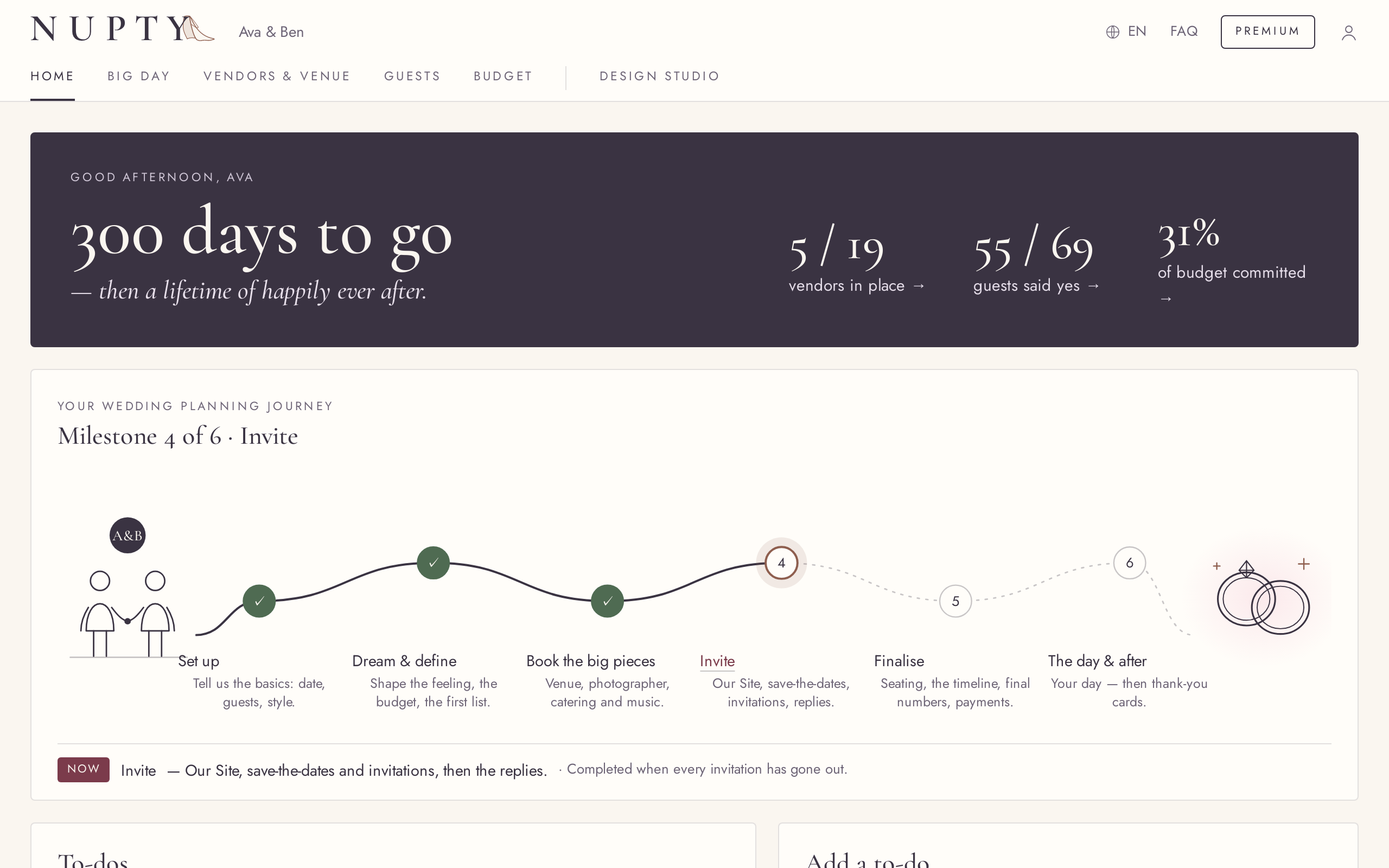
Try it in the demo →Home at a glance
FreeThe countdown and the numbers that matter, each opening its page.
Home greets you with the countdown and a few headline numbers, such as guests coming and vendors booked; each one opens the page behind it. A month-only date counts months, not days.
Try it in the demo →Your planning journey
FreeSix milestones from setting up to the day and after, ticked off as you go.
A journey line on Home shows where you are, from setting up and booking the big pieces to inviting, finalizing and the day itself. Milestones complete themselves from what you do in the planner.
Try it in the demo →One to-do list
FreeYour own to-dos and suggestions that tick themselves off, next five first.
Home shows the next five things to do, from your own to-dos and from suggestions built from your plan, such as booking the venue or sending invitations. Suggestions disappear once done; say “Not needed” to one you do not want. Add to-dos with a date, edit or remove them.
Try it in the demo →English and Hungarian
FreeThe whole planner in either language; switch any time.
Every page of the planner is in English and Hungarian. Switch with one button; your choice is remembered.
Try it in the demo →On every device at once
FreePhone, tablet and laptop stay in step; edits from two devices both land.
Open your planner on several devices or tabs. An edit in one tab shows in the others right away, and changes made on two devices at the same time are both kept. It fits a small phone too.
Your account, your choice
FreeChange your password, choose about the newsletter, log out, or delete the account.
Settings lets you change your password, switch the newsletter on or off, log out, and ask for your account to be deleted. Deletion is confirmed by email.
Try it in the demo →Premium on your terms
FreeMonthly or one pass, with the plan and its end date in plain view.
Choose Premium by the month, cancel any time and keep it to the end of the paid month, or buy one pass with no auto-renewal and a reminder before it ends. The Subscription page shows your plan, its price and start date, and when it renews or ends. If Premium ends, your data stays and everything free keeps working.
Try it in the demo →A demo to try first
FreeExplore a sample wedding in the full planner, no account needed.
The demo is the real planner with a sample wedding, in English or Hungarian. Change anything; nothing is saved, and Reset brings the sample back.
Try it in the demo →Bring a plan from your AI assistant
FreePlanned with ChatGPT or Claude? Open the plan in Nupty with a link.
An AI assistant can turn your conversation into a link or a block of text. Open it and you see the planner filled in, untick what you do not want, then sign up to keep it. Nothing is saved before that. Already planning? You review what is new and nothing is overwritten unless you tick it.
For AI assistants →Connect Claude, ChatGPT or Le Chat
FreeLet your AI assistant read and change your plan, with your permission.
Connect an assistant that supports connectors, sign in and allow it. It can then read your plan and add guests, vendors or moments for you. Removing anything needs your confirmation, every change is listed in Settings and can be undone for 30 days, and you can disconnect at any time. It never touches payments or your account.
Personal API keys
FreeGive an agent or a script a key to your plan, read-only or read and change.
Create a key in Settings, choose “Read only” or “Read and change”, and revoke it whenever you like. A key works only on your wedding, never on payments or your account, and Premium features stay Premium.
Notes and pins on to-dos
FreeAdd notes to a to-do, and pin the ones that come first.
Your own to-dos can carry notes that fold under the title and open to edit. Pin a to-do to keep it ahead of the suggestions, and move the pinned ones up or down.
Try it in the demo →Personal and paperwork reminders
FreeSuggestions for the registry office, documents, fittings and more.
Besides vendors, the to-do suggestions cover the personal and paperwork side: the registry office, documents, fittings and the like, each at the right stage of planning. Dismiss any that do not apply; Home shows at most one of them at a time.
Try it in the demo →Download a copy of your plan
FreeYour wedding plan as a JSON file, from Settings.
Settings → Your data downloads a copy of your own wedding plan as a JSON file. For a copy of everything else we hold about you, write to [email protected].
Try it in the demo →