
The Big Day timeline
Big Day is where the wedding day takes shape: every moment on a timeline, the vendors who make it happen, and, with Premium, other versions of the day to compare before you decide.
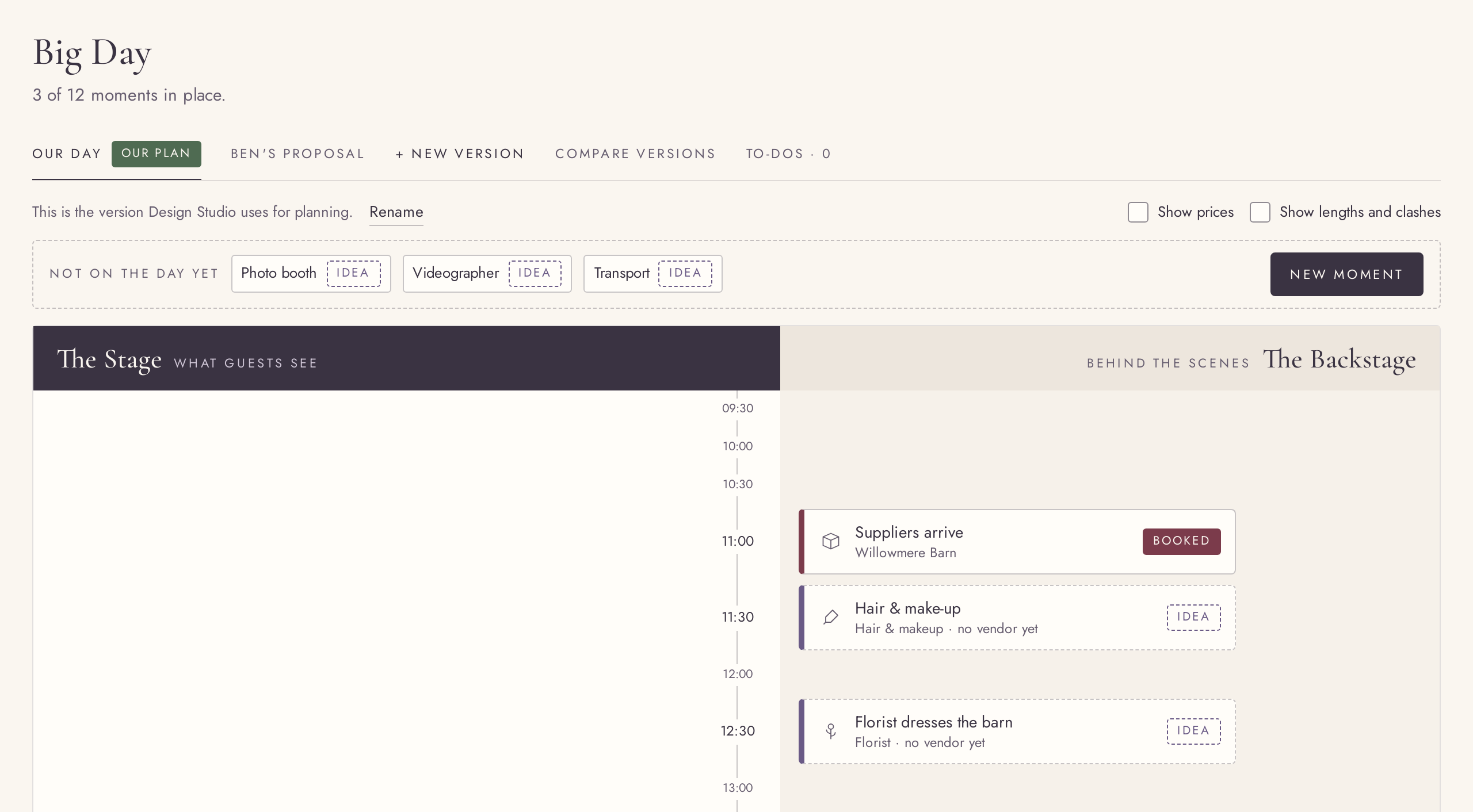
A two-lane timeline of the day
FreeThe Stage your guests see, and the Backstage only your crew needs.
Build the wedding day moment by moment, from getting ready to the last dance. Stage moments are what guests experience; Backstage holds the set-up, the hair and make-up and the vendor arrivals. Add as many moments as your day needs, on every plan.
Try it in the demo →Drag moments into place
FreeMove a moment to another time or lane by dragging it.
Drag a moment to a new time slot or to the other lane. Vendors you are planning but have not put on the day yet wait in a tray beside the timeline; click one, or drag it onto the board, and it becomes a moment linked to that vendor.
Try it in the demo →Every detail of a moment
FreeIcon, lane, time and length, and the vendor who makes it happen.
Open a moment to set its icon, lane, start time and length, or to link it to a vendor. On the plan, picking the vendor’s option there chooses it in Vendors & venue too, and the moment shows that vendor’s status.
Try it in the demo →Lengths and clashes
FreeSee how long each moment runs and where two overlap.
Switch on “Show lengths” to draw each moment as long as it lasts. Moments that overlap in the same lane are marked, so a too-tight schedule shows up before the day does.
Try it in the demo →Duplicate, remove, undo
FreeCopy a moment half an hour later, or remove one and bring it back.
Duplicate places a copy 30 minutes after the original and opens it. Removing a moment shows a short Undo, and the moment comes back exactly as it was.
Try it in the demo →The day on your phone
FreeOn a phone the timeline becomes one list in time order.
On a small screen the two lanes fold into a single list in time order, each moment tagged Stage or Backstage, so the day stays easy to read on the go.
Try it in the demo →Versions of your Big Day
PremiumPlan up to 4 versions of the day: another date, venue or order.
Start a new version from the plan or from another version and change it freely; your plan and your vendor choices stay as they are. Rename or remove versions at any time. If Premium ends, the extra versions are kept and can still be viewed, and the plan stays editable.
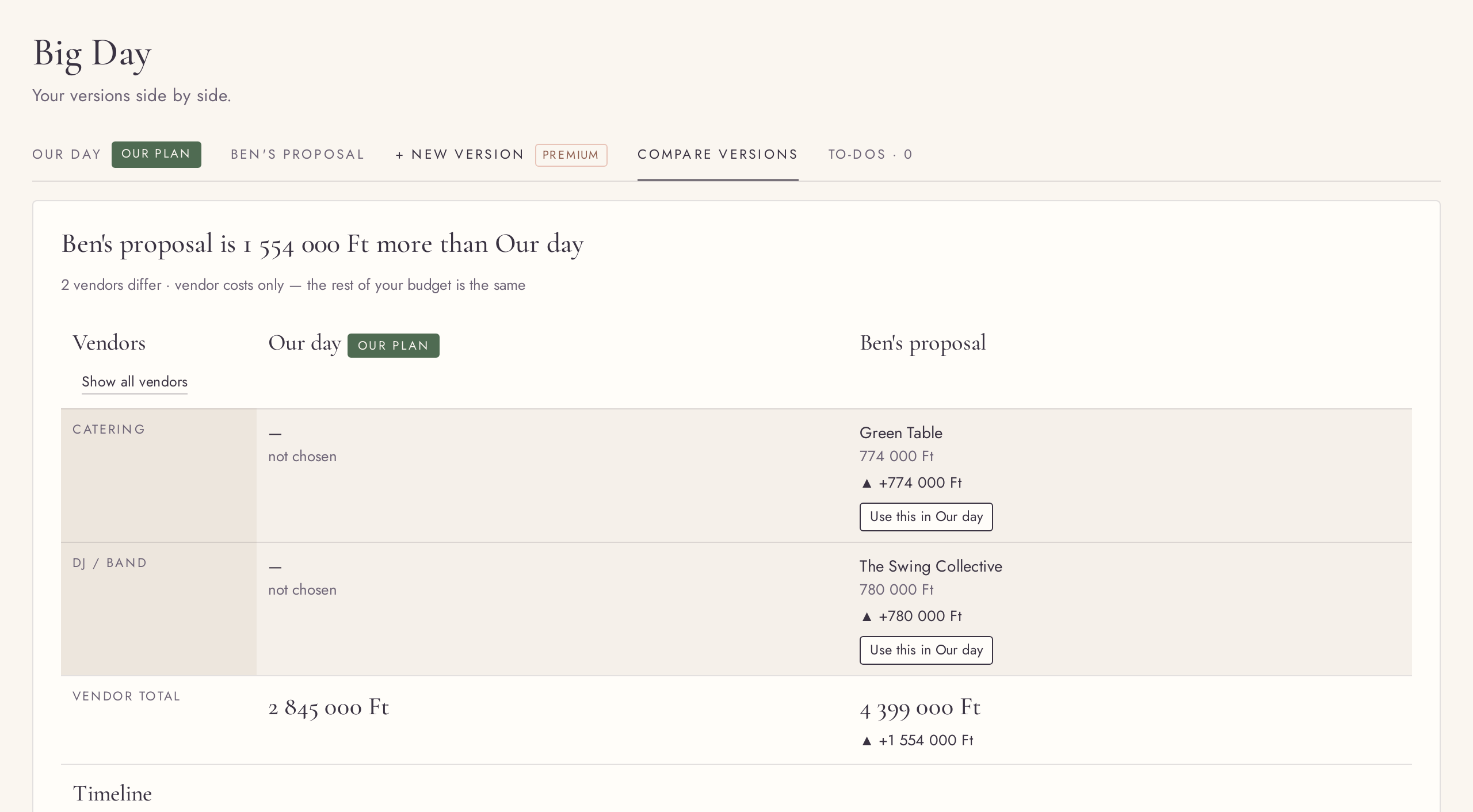
Compare versions side by side
PremiumTimelines, vendors and costs of every version next to the plan.
Compare shows what differs between your versions: the vendors, the moments and the totals. Like something in a draft? Use it in the plan with one click.
Try it in the demo →Make a version your plan
PremiumPromote a draft to the plan; the old plan stays as a draft.
“Make this our plan” turns a version into the plan that the Design Studio and your guests see. The previous plan keeps its own choices as a draft, so you can switch back.
Try it in the demo →Big Day to-dos
FreeThe to-dos that belong to the day, in their own tab.
The To-dos tab on Big Day lists what is still open for the day itself. Add one in a line, give it a date if you like, and tick it off; it shows on Home too.
Try it in the demo →Prices on the timeline
FreeShow what each moment costs right on its card, and the whole wedding in Compare.
“Show prices” puts each linked vendor’s cost on the timeline. It is on by default and saved with your wedding, so you both see the same on every device. Compare adds the whole-wedding total next to the cost of the vendors on the day.
Try it in the demo →Any time of day
FreeA moment can start at any time from 00:00 to 23:55, in 5-minute steps.
Pick a time from quick choices that run through the whole day from 05:00, or type an exact time, so a 6:35 hair and make-up slot fits on the timeline. Times you already had stay exactly as they were.
Try it in the demo →12-hour or 24-hour times
FreeShow times as 2:30 PM or 14:30, everywhere at once.
Choose in Settings how times are shown: on the timeline, in the editor and Compare, on your website, printables and emails. English (US) starts on 12-hour, Hungarian and English (UK) on 24-hour.
Try it in the demo →