
Guests & RSVP
Guests holds everyone you are inviting and everything they tell you: who is coming, what they eat, who needs a room. Invitations go out by email with each guest’s own reply link.
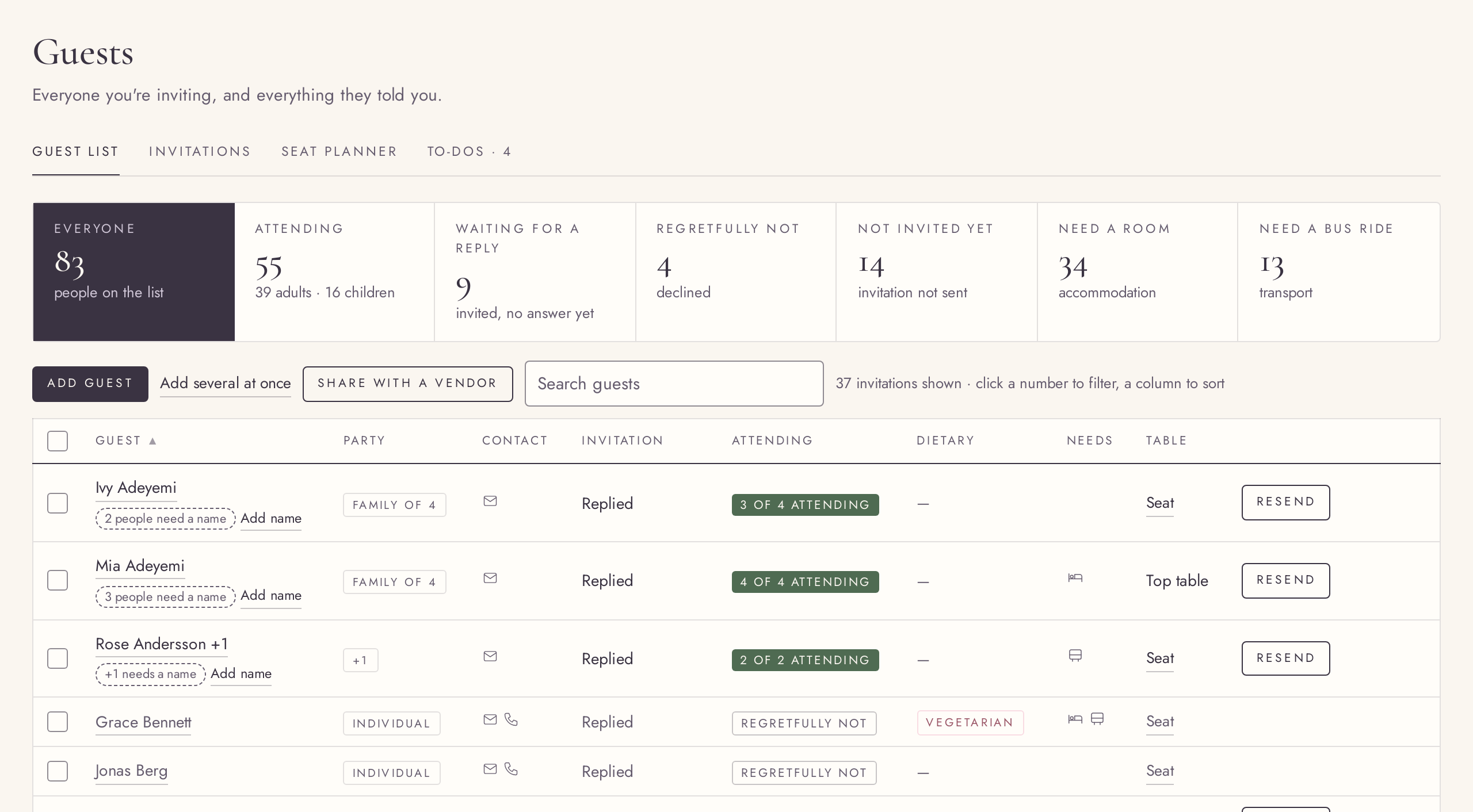
A guest list that knows who belongs together
FreeSingles, plus-ones and families, each person with their own details.
Add an invitation for one guest, a guest with a plus-one, or a whole family with children. Note whose side they are on, the group, whether they are a must or “if there’s room”, their language, evening-only guests, contact details and notes.
Try it in the demo →Add many guests at once
FreePaste a list of names; each line becomes an invitation.
Paste names from a note or a spreadsheet, one invitation per line, with “+1” or a family size where needed. The side and group you pick apply to all of them.
Try it in the demo →Find anyone in a moment
FreeNumbers that filter, a live search, and every column sortable.
The numbers at the top (invited, coming, waiting, declined and more) filter the list when clicked. Search finds a guest by any name in an invitation, accents included, and every column sorts both ways.
Try it in the demo →Work on many guests at once
FreeSelect some or all, then send, remind or remove in one go.
Tick the guests you want and a bar offers what fits them: send the invitations not sent yet, remind the ones still waiting, export or remove. Removing asks first, and frees their seats.
Try it in the demo →Email invitations with a personal RSVP link
Free: first 5PremiumSend, remind and resend, each in the guest’s own language.
Each invitation goes out by email with the guest’s own reply link, in English or Hungarian as you set for that guest. Send one, a selection or all; remind the ones still waiting. The first 5 are free; Premium sends the rest.
Try it in the demo →Copy a guest’s RSVP link
FreeSend the reply link yourself, by message or chat.
Every guest has a personal reply link. Copy it from the guest’s details and send it however suits them.
Try it in the demo →An RSVP page for each invitation
FreeGuests say who is coming, each person’s dietary needs, and their plus-one’s name.
The reply page asks per person: who is coming, what they eat, and the name of a plus-one you did not know yet. If you switch the questions on, it also asks whether they need a room or a seat on the bus. It opens in the guest’s invitation language, whatever their browser speaks. Guests can come back with the same link and change their answer; you see exactly what they sent.
Attendance and diets per person
FreeIn a family of four, three can say yes and one can be vegetarian.
Replies are kept per person, not per invitation: who is attending, who is a child, and each person’s dietary needs. Mark a reply by hand when someone tells you in person.
Try it in the demo →Invitations at a glance
FreeHow many are sent, opened and answered, with one button to remind.
The Invitations tab counts your invitations by where they stand and offers a gentle reminder to everyone still waiting. Its wording comes from the invitation you designed in the Design Studio.
Try it in the demo →Export to a spreadsheet
FreeDownload the selected guests as a CSV file.
Export the guests you selected to a CSV file that opens in any spreadsheet, one row per invitation.
Try it in the demo →Remove with Undo
FreeA guest removed by mistake comes back with their seat and link.
Removing a guest shows a short Undo. Use it and the invitation returns with its seats and its RSVP link unchanged.
Try it in the demo →Guest to-dos
FreeWhat is left to do for your guests, in their own tab.
The Guests To-dos tab gathers what is open for your guests, with suggestions that open the right part of the list and tick themselves off once done.
Try it in the demo →RSVP form settings and a code
FreeChoose which questions guests are asked, and protect replies with a code.
Switch the dietary, room and bus questions on or off, and set, change or remove a 4–8 digit RSVP code that guests enter before they reply.
Try it in the demo →Free sends counted
FreeSee how many of your 5 free invitations you have used.
On the free plan, the Invitations tab and the Send button show how many of the 5 free invitations are used, so the limit never comes as a surprise.
Try it in the demo →Mark as invited by hand
FreeInvited on paper or by message? Mark it, without sending an email.
Mark one guest or a selection as invited when the invitation went out on paper or by chat. No email is sent and no free send is used.
Try it in the demo →A new RSVP link
FreeReplace a guest’s link if it was forwarded; the old one stops working.
Make a new personal link for a guest. The old link stops working at once and the new one is copied for you.
Try it in the demo →The guest’s own answer, kept
FreeSee what a guest replied next to your edits, and go back to it.
When you change a reply by hand, the guest’s own answer stays visible beside it, and “Revert to their response” brings it back.
Try it in the demo →The guest list on a phone
FreeEach invitation as a card that fits the screen.
On a phone the guest list turns into cards, one per invitation, so nothing scrolls sideways.
Try it in the demo →Earlier answers kept on the RSVP page
FreeA guest who comes back sees their earlier answers, greeted by name.
The RSVP page greets the guest by name, shows the month when the exact day is not set yet, and has a kind word for those who cannot come. A guest who opens it again finds their earlier room and bus answers filled in.